Surflux Playground Guide
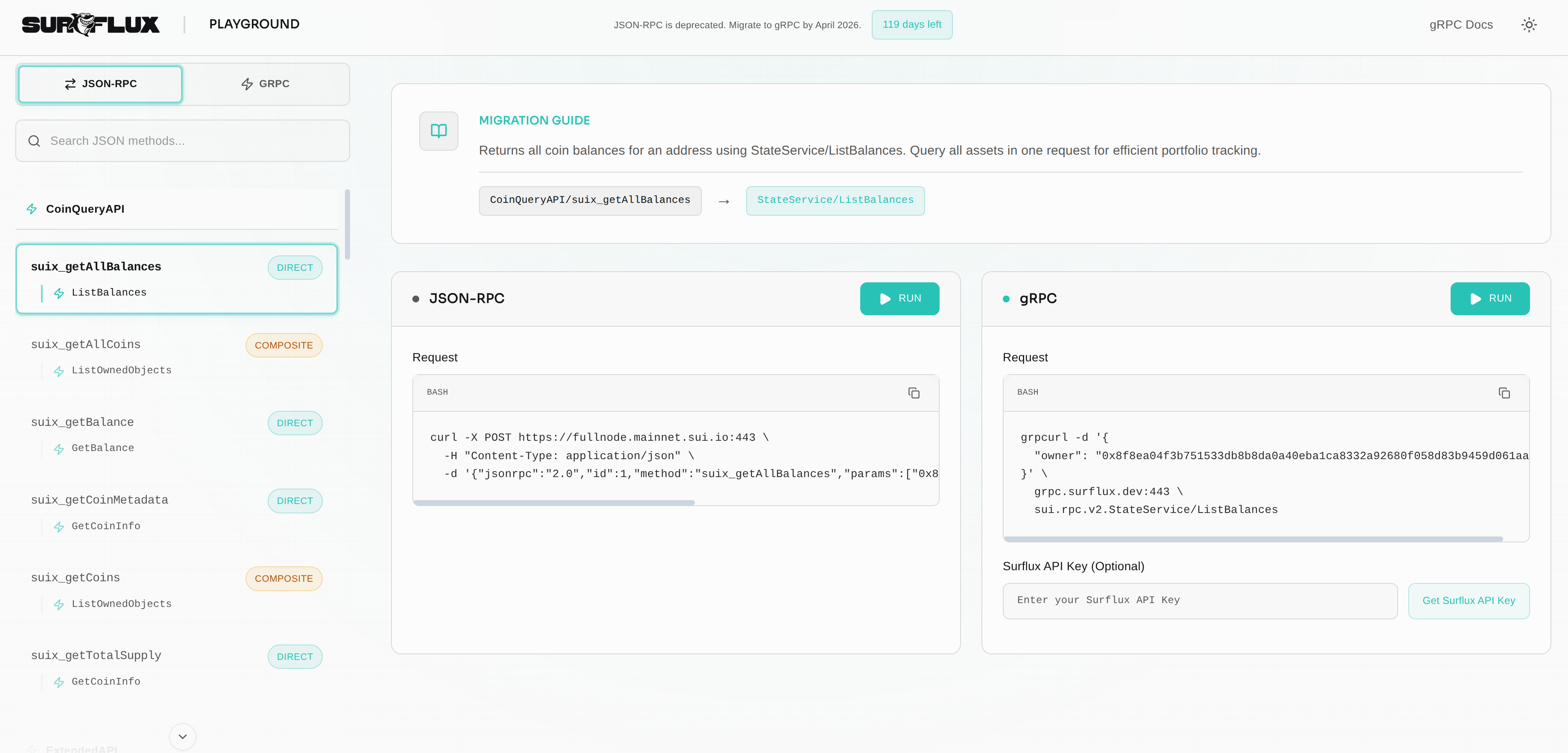
The Surflux Playground is an interactive tool designed to help developers explore the Sui gRPC API and migrate from JSON-RPC. It provides a side-by-side comparison of JSON-RPC and gRPC requests, allowing you to see exactly how your existing calls map to the new API.
Core Features
1. Side-by-Side Comparison
For every supported JSON-RPC method, the playground displays the equivalent gRPC service and method. This visual mapping is invaluable for understanding the structural differences between the two APIs.
2. Interactive Execution
You can execute requests directly from the browser against the Sui mainnet.
- JSON-RPC: Runs standard JSON-RPC calls.
- gRPC: Executes gRPC requests using
grpc-web.
3. Code Generation
The playground generates ready-to-use code snippets. This is the fastest way to learn the new CLI syntax.
JSON-RPC (cURL)
curl -X POST https://fullnode.mainnet.sui.io:443 \
  -H "Content-Type: application/json" \
  -d '{
    "jsonrpc": "2.0",
    "id": 1,
    "method": "suix_getBalance",
    "params": ["0x..."]
  }'
gRPC (grpcurl)
grpcurl -d '{
  "owner": "0x..."
}' grpc.surflux.dev:443 sui.node.v1.StateService/GetBalance
Copy the generated grpcurl command directly from the playground to test in your local terminal!
Note: To run commands against grpc.surflux.dev from your terminal, you must include your Surflux API Key as a metadata header (-H "x-api-key: YOUR_KEY").
Deep Dive: Field Masks
One of the most powerful features of the new gRPC API is Field Masks. Unlike JSON-RPC, where you often receive a massive payload containing data you don't need, gRPC allows you to specify exactly which fields to return.
The playground allows you to interactively toggle fields and see the impact on the response.
Without Field Mask (Standard)
Retrieving an object might return the entire state, including previous transaction hashes, storage rebates, and full content.
{
  "objectId": "0x123...",
  "version": "10",
  "digest": "AbC...",
  "content": { ... }, // Large object
  "owner": { ... },
  "previousTransaction": "..."
}
With Field Mask
By selecting only object.owner and object.digest, the response is significantly smaller and faster to parse.
{
  "objectId": "0x123...",
  "digest": "AbC...",
  "owner": { "AddressOwner": "0x789..." }
}
Using field masks can reduce payload size by up to 90% for complex objects, significantly improving your application's performance and reducing bandwidth costs.
How to Use
- Select a Method: Use the sidebar to browse methods by category (e.g., Coin, Governance, Read) or search for a specific JSON-RPC method name (e.g.,
sui_getObject). - Configure Parameters:
- For gRPC requests, you can select specific Field Masks to tailor the response.
- Optionally, enter your Surflux API Key if you have one.
- Run Request: Click the Run button for either JSON-RPC or gRPC.
- Inspect Response: View the formatted JSON response below the request block. Compare the data structures and values returned by both APIs.
FAQ
Is the playground free to use?
Yes! The playground application itself is free to use. It uses public endpoints for JSON-RPC and our hosted gRPC endpoint for interactive testing within the browser.
Note: If you copy the generated gRPC commands to run locally, you will need a Surflux API Key to authenticate against grpc.surflux.dev.
Do I need an API Key?
An API Key is optional but recommended. Using an API Key gives you higher rate limits and ensures consistent performance, especially if you are running many requests.
Where can I get an API Key?
You can generate a free API Key at the Surflux Dashboard.
Migration Workflow
Use the playground as your primary reference during migration:
- Identify a JSON-RPC call in your codebase.
- Find it in the playground.
- Run the equivalent gRPC call to verify the data matches your expectations.
- Copy the gRPC service/method names and parameters into your application code.